 OvercomeMedia
The best CRM for contractors depends on which job you need done. GoHighLevel, Jobber and Housecall Pro do different jobs. Jobber and Housecall Pro run the work: quotes, scheduling, dispatch, invoices and payment. GoHighLevel is a marketing CRM that catches every lead and runs the follow up.
Key points
- The crew runs Jobber or Housecall Pro from a phone.
- GoHighLevel runs automated texts, follow up ladders, pipelines and review requests.
- GoHighLevel is sold mostly through agencies.
- A contractor with a few trucks usually runs one field service tool, plus GoHighLevel if an agency runs their marketing.
- As of October 2026, Jobber starts at $49 a month, Housecall Pro at $79, and GoHighLevel at $97 for a direct account or less through an agency.
- The right pick depends on crew size and on who will chase the leads.
We use all three on client accounts, GoHighLevel on nearly every one. This comparison comes from running them, not from reading feature pages.
Prices were checked on each vendor’s pricing page in October 2026 and will change. Confirm before you buy.
In this guide
- Two different jobs, three tools
- What GoHighLevel does well, and does not
- Jobber
- Housecall Pro
- What each one costs in 2026
- Which one a contractor should pick
- How we wire them together
- Frequently asked questions
What is the difference between GoHighLevel, Jobber and Housecall Pro?
Two jobs. The first is getting the lead and following it up until it books. That means:
- Capturing calls, forms and messages in one place.
- Texting back a missed call in 30 seconds.
- Running the call back ladder.
- Asking for the review afterwards.
The second is running the job itself. That means:
- The quote.
- The schedule.
- The dispatch.
- The invoice.
- The payment.
- The QuickBooks sync.
GoHighLevel was built for the first job. Jobber and Housecall Pro were built for the second. They have added pieces of the first over time.
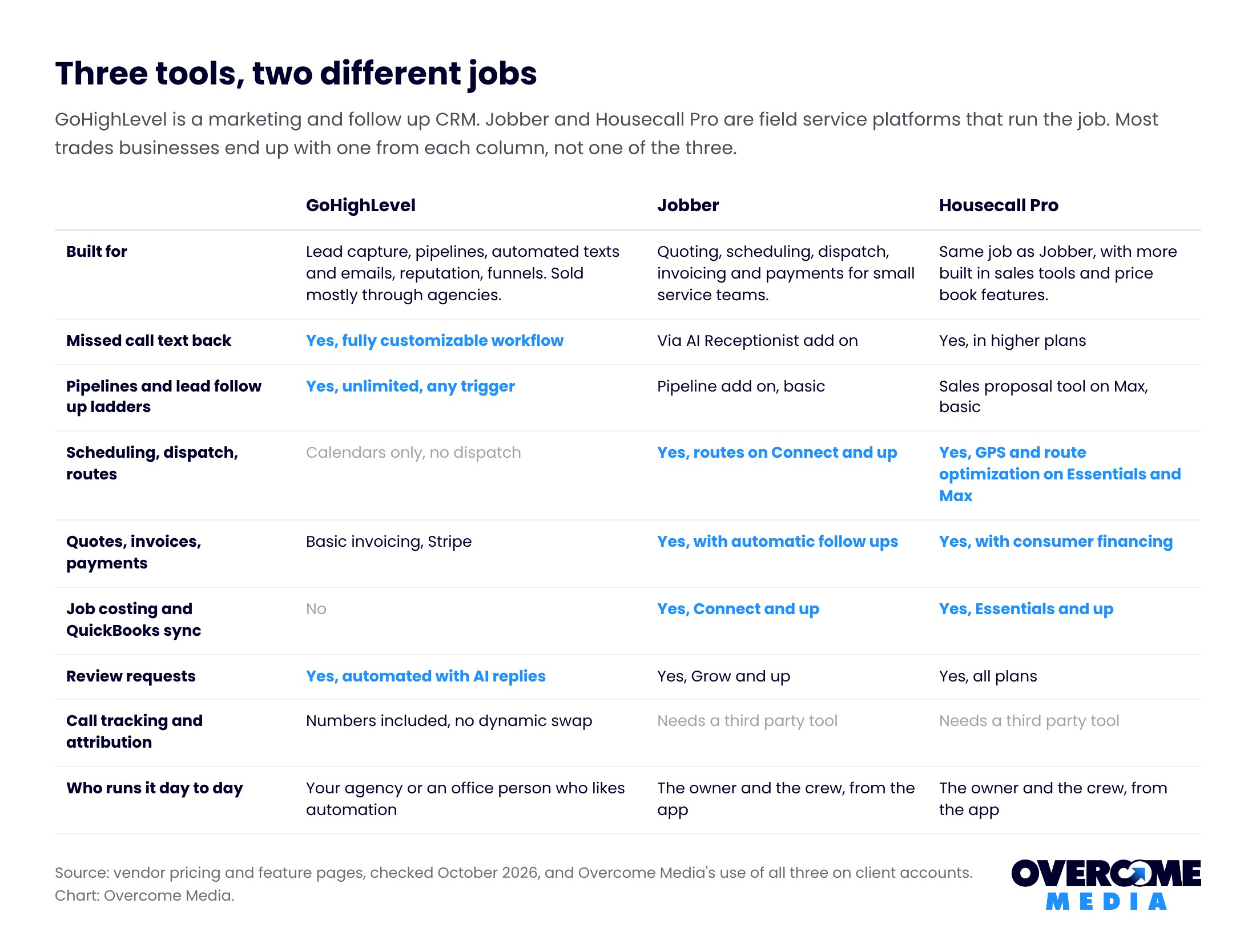
For a company with more than two trucks, “which one should I pick” is usually the wrong question. The question is which field service tool, and whether you need GoHighLevel on top of it.
What does GoHighLevel do well for contractors, and what does it not do?
GoHighLevel is the best lead follow up machine we have used for trades businesses. The reason is the workflow builder. Any event can trigger any sequence:
- A missed call on a tracked number sends a text in 30 seconds and creates a task.
- A form submission starts a three day call and text ladder.
- A job marked complete sends the review link.
- A lead that goes quiet for 30 days gets a check in.
Every one of those is a workflow we run on client accounts. None of them needs a developer.
Unlimited contacts and users on every plan means the whole crew can be in it. It also includes phone numbers, two way texting, and a unified inbox for Facebook and Instagram messages. There is a reputation tool with AI drafted review replies, calendars and basic invoicing.
What it does not do is run a service business. It has none of these:
- Dispatch board.
- Route optimization.
- Job costing.
- Price book.
- Technician GPS.
- QuickBooks job sync.
A roofing or HVAC company that tries to run everything on GoHighLevel ends up scheduling from a calendar. Invoicing happens from a generic form. The crew hates it.
It is also built for agencies. The pricing is per agency account with sub accounts. The interface assumes someone who likes automation.
Most contractors get it as part of a marketing engagement rather than buying it direct. That is how we supply it.
Want this done for you? Book a free 15 minute call or call (859) 710-8408. We will tell you what to fix first, no pitch.
What is Jobber best for?
Jobber is the cleaner of the two field service tools for a small team, and the cheapest way in. Core at $49 a month for one user covers booking, scheduling, quotes, invoices and online payments.
- Connect adds the automations a growing company needs: appointment reminders, automatic payment collection, quote and invoice follow ups, job checklists and QuickBooks sync.
- Grow adds two way texting, job costing, upsell line items on quotes and custom workflow automations.
- Plus bundles the Marketing Suite, the AI Receptionist and Pipeline. On lower plans those are $99, $29 and $49 add ons.
Where it falls short against GoHighLevel is the lead side. The pipeline is basic. The automations are built around jobs rather than leads.
Attribution needs a third party call tracking tool. Where it beats everything is day to day usability for an owner who schedules from the truck.
What is Housecall Pro best for?
Housecall Pro does the same job as Jobber with more sales tooling and more users included per plan.
- Basic at $79 covers one user with booking, scheduling, estimates, invoicing, payments, consumer financing, a price book, job costing and review management.
- Essentials at $189 includes five users and adds routes, flat rate pricing, technician GPS, photo reports and QuickBooks sync.
- Max at $329 includes eight users, a sales proposal tool, recurring service plans, route optimization, API access and escalated support.
It is the stronger fit for HVAC and plumbing companies that sell maintenance plans. Those are the companies offering good better best options at the kitchen table.
Same gaps as Jobber on the lead side, and the same note on attribution. Watch the promotional pricing. The first months are often discounted and the list price applies after.
How much do GoHighLevel, Jobber and Housecall Pro cost in 2026?
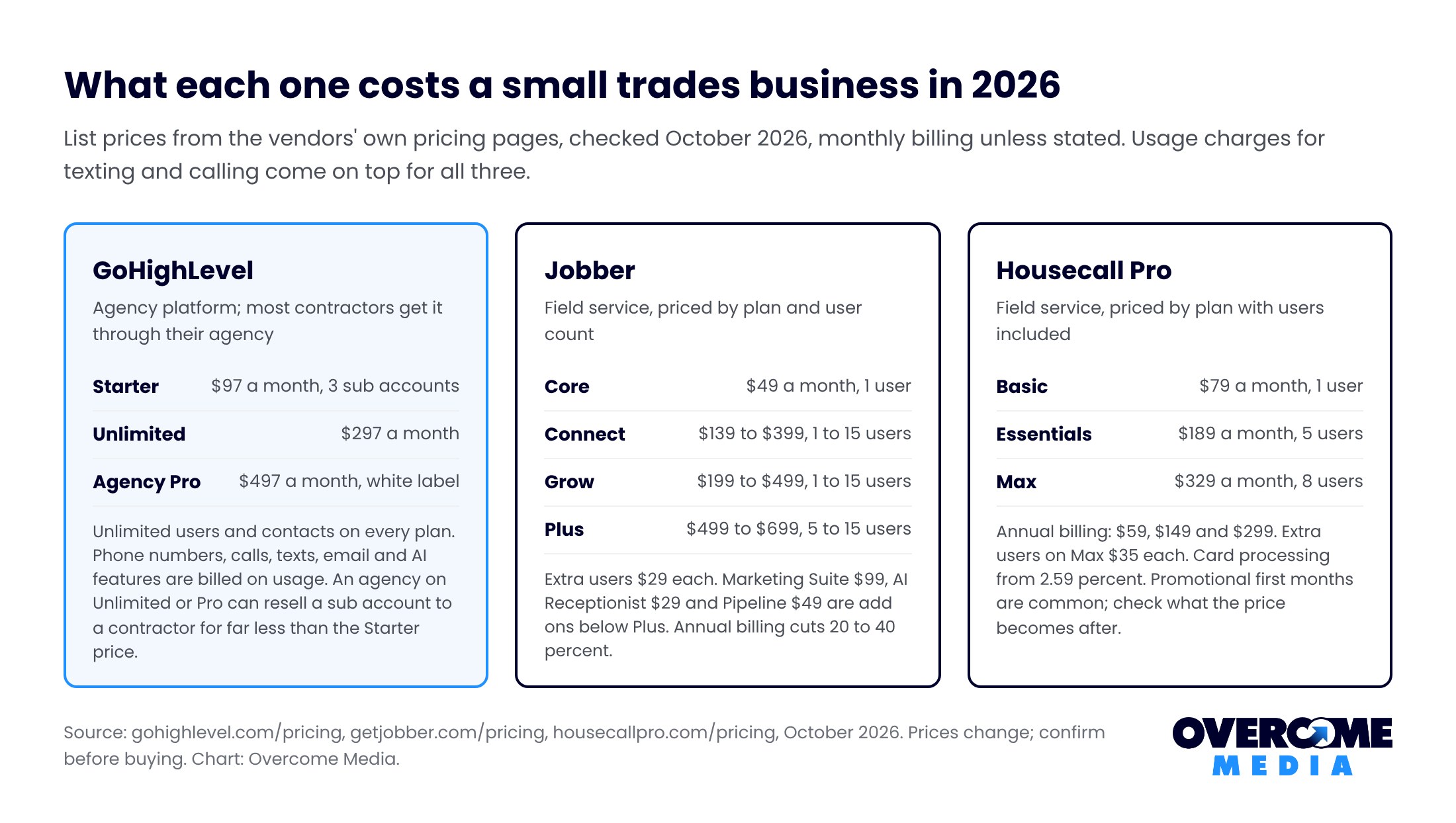
Three notes on reading that chart.
- GoHighLevel’s $97 Starter is an agency account with three sub accounts. A contractor buying direct pays for capacity they do not need. Through an agency on the $297 or $497 plan, the sub account you get is a fraction of that.
- Jobber’s price depends on both plan and user count. A five person crew on Grow is $299, not $199.
- All three charge usage on top for texting and calling. For a busy trades business that is typically $20 to $80 a month.
Which CRM for contractors should you pick?
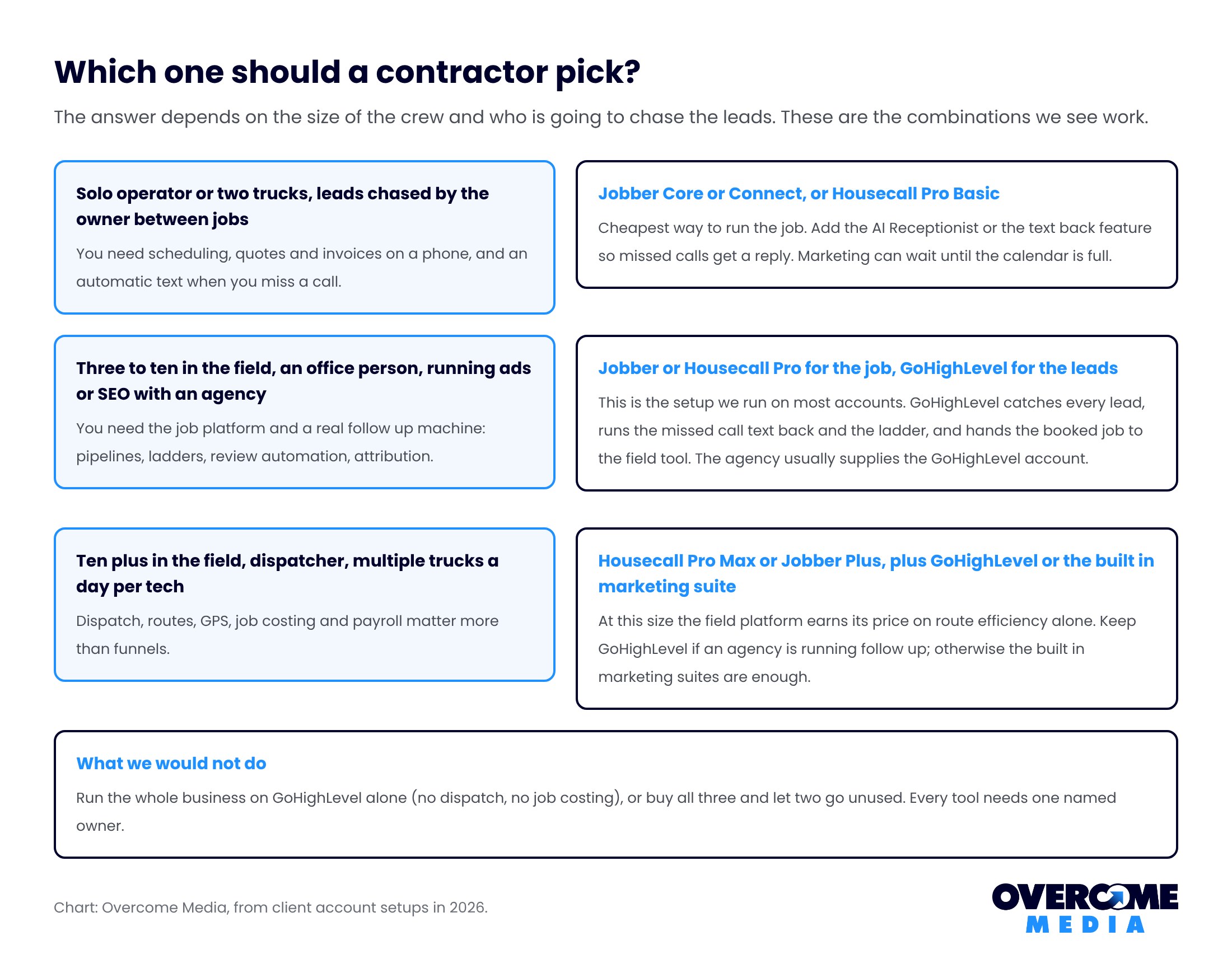
- Solo or two trucks, chasing leads yourself: Jobber Core or Connect, or Housecall Pro Basic, with the text back feature turned on.
- Three to ten in the field with an office person and an agency running ads or SEO: Jobber or Housecall Pro for the job, GoHighLevel for the leads. That is the setup on most of our accounts.
- Ten plus with a dispatcher: Housecall Pro Max or Jobber Plus. Keep GoHighLevel only if an agency is running follow up. At that size the built in marketing suites are enough.
What we would not do: run the whole business on GoHighLevel alone, or buy all three and let two go unused. Every tool needs one named person who owns it.
How do we wire GoHighLevel to Jobber or Housecall Pro?
- Every lead lands in GoHighLevel first. Tracked phone numbers, website forms, Local Services Ads leads, Facebook and Instagram messages, Business Profile messages. Call tracking attaches the source.
- GoHighLevel runs the response. Missed call text back, the call back ladder, the task for whoever is on phones. The sequence is in our speed to lead guide.
- When the lead books, it becomes a job in the field tool. Through the native integration where one exists, otherwise through a Zapier or Make connection on “opportunity won”. The job, the crew and the invoice live in Jobber or Housecall Pro from here.
- Job complete fires back to GoHighLevel for the review request and the value against the original lead. Cost per booked job by channel becomes a report, not a guess.
The handoff in step three is the piece that breaks most often. Test it with a fake lead every month.
Frequently asked questions
Is GoHighLevel worth it for a contractor?
If someone is going to run lead follow up through it, yes. Its missed call text back and ladders alone recover leads worth many times its price. If nobody will own it, no.
It is not a replacement for a field service tool. Most contractors should get it through their agency rather than buying an agency plan direct.
Jobber vs Housecall Pro: which is better?
Jobber for a small crew that wants the simplest, cheapest way to quote, schedule and invoice. Housecall Pro for a company selling maintenance plans and proposals with options, or one that wants more users included per plan. Both need a separate tool for call tracking and attribution.
What is the best CRM for a home service business?
The best CRM for contractors is usually two tools. For lead capture and follow up, GoHighLevel. For running the jobs, Jobber or Housecall Pro. Most home service businesses past two trucks use one of each, connected so a booked lead becomes a job automatically.
How much does GoHighLevel cost?
As of October 2026, it is $97 a month for Starter (three sub accounts), $297 for Unlimited and $497 for Agency Pro. Usage for calls, texts, email and AI is extra. Contractors who get it through an agency usually pay far less, since the agency’s plan covers the account.
Can Jobber or Housecall Pro do a missed call text back?
Jobber does it through its AI Receptionist add on ($29 a month, included on Plus). Housecall Pro offers it through its phone and AI add ons. GoHighLevel does it as a fully customizable workflow on every plan. That is why we run it there even when the client has a field service tool.
Not sure which setup fits your crew?
Tell us how many trucks you run and who answers the phone. We will tell you which tools we would put in and which we would leave out. Request the free audit or call (859) 710-8408.
Overcome Media is a marketing agency in Lexington, Kentucky. We run CRM setup, lead tracking, SEO and paid ads for roofing, HVAC, junk removal and other trades businesses. We work across Kentucky, Ohio and the surrounding states.
Sources
- GoHighLevel pricing, Jobber pricing and Housecall Pro pricing, all checked October 2026
- Overcome Media client account setups, 2026

Written by
Faisal Zaman
Senior SEO Strategist, Overcome Media
Faisal runs SEO for Overcome Media’s roofing, HVAC, junk removal and dumpster rental clients. He builds the Google Business Profile, location page and content plans that get blue collar companies into the map pack, and writes the Knowledge Base from what works on live client accounts.