 OvercomeMedia
HVAC website design has three jobs. Catch the no heat or no cool emergency, rank a page for every system you sell, and sign up maintenance plan members. A site that does all three keeps the phone busy in the peak and the shoulder months.
Key points
- Emergency callers decide in seconds, so the call button comes first.
- Only about half of home services callers reach a live person.
- People search by system, so each system needs its own page.
- Heat pumps outshipped gas furnaces in the US in 2025.
- ENERGY STAR recommends a professional check up every spring and fall.
- A maintenance plan page turns that advice into recurring revenue.
We build websites and run SEO for heating and cooling companies. The site findings here come from our own HVAC audits in 2026. Names and towns are withheld.
Market and consumer figures come from AHRI, the EIA, ENERGY STAR, Invoca, CallRail and BrightLocal. Each is named where it appears.
In this guide
- What an HVAC site needs to do
- Handling emergency calls
- A page for every system
- Selling maintenance plans
- Getting ready for each season
- What makes visitors call
- Frequently asked questions
What does good HVAC website design need to do?
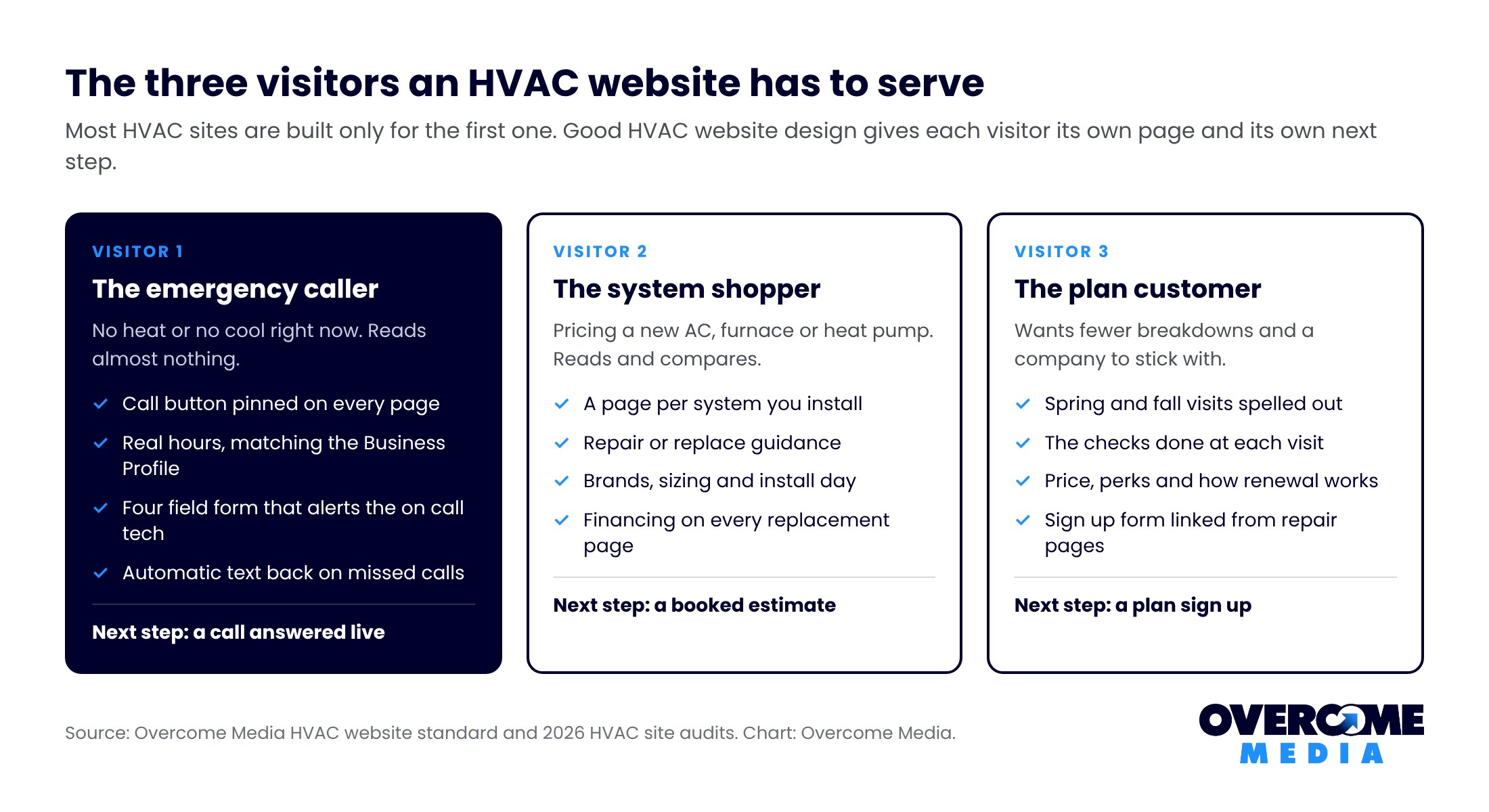
Serve three visitors who want very different things. Most HVAC sites are built for only one of them.
- The emergency caller. The house is 88 degrees or 50 degrees. They want a number and a time.
- The system shopper. They are pricing a new AC, furnace or heat pump. They read and compare.
- The plan customer. They want a tune up and a reason to stay with you.
Cooling alone is a huge market. The EIA’s 2020 household energy survey found 88 percent of US homes use air conditioning.
The basics of structure, speed and tracking apply to every trade. Our contractor website design guide covers them. This article covers what is specific to heating and cooling.
How should an HVAC website handle emergency calls?
Put the call button above everything else, then make sure someone answers it. The site can only deliver the call. The phone has to catch it.
That second part is where HVAC loses most. Invoca’s July 2026 home services benchmarks found about 52 percent of callers reach a live person.
The range across sub industries runs from 32 to 74 percent. Industry reporting puts HVAC near the low end.
And the caller does not wait. CallRail’s 2025 survey found 82 percent of people would call a competitor after an unanswered call.
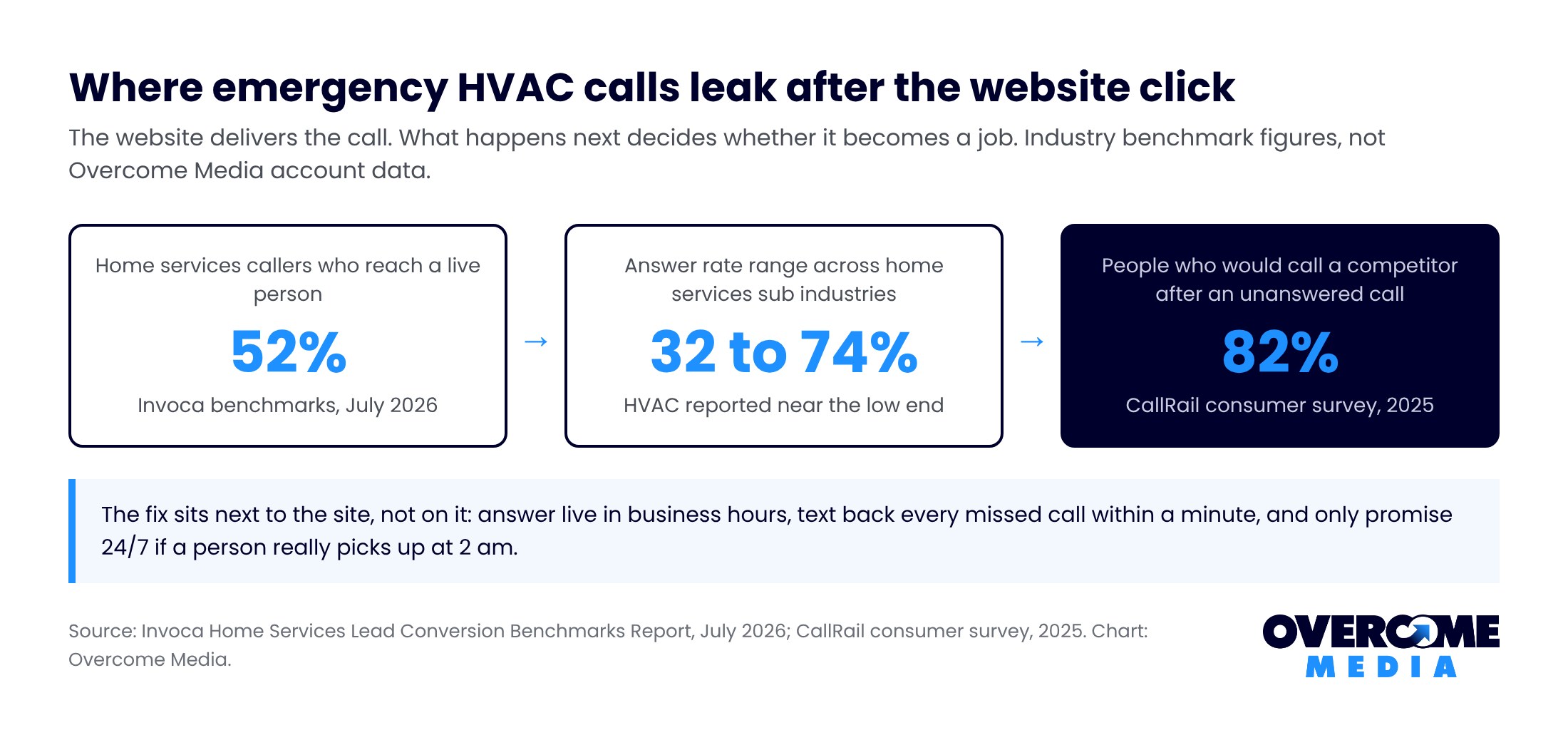
What the emergency path on an HVAC site needs:
- A call button pinned to the phone screen on every page.
- Your real hours, matching your Business Profile exactly.
- After hours terms in plain words, if you offer after hours service.
- A short “no heat” or “no AC” form that texts your on call tech.
- An automatic text back for every missed call.
Keep that emergency form to four fields. Name, phone, address, and a dropdown for no heat, no cool, leak or noise. Add a checkbox for an elderly person or a baby in the home, so the dispatcher can triage.
Only say 24/7 if it is true. A caller who gets voicemail at 2 am after reading “24/7” will not call twice, and may leave a review.
Our speed to lead guide has the text back wording and the call back ladder.
Why does an HVAC website need a page for every system?
Because people search for the system they own or want. One “services” page cannot rank for heat pumps, furnaces and ductless at once.
Heat pumps alone make the case. AHRI data for 2025 shows about 3.6 million air source heat pumps shipped in the US. Gas furnaces came in at about 3.2 million.
A company without a heat pump page is missing a system that now outships the furnace.
We saw the cost on one HVAC account. Search Console showed the site appearing for heat pump, humidifier and water heater searches. None of the three had a page, so the site sat far down the results.
The same account had town pages showing up around position 40. That is page four, where nobody clicks.
A starting set of system pages:
| Page | What the searcher wants | What the page must show |
|---|---|---|
| AC repair | Cool air today | Call button, hours, common fixes |
| Furnace repair | Heat tonight | Call button, after hours terms, safety notes |
| Heat pump installation | A new system, maybe rebates | Models you install, sizing, financing |
| AC replacement | A price range and options | Brands, efficiency, timeline, financing |
| Ductless mini splits | One room or an addition | Where they fit, real install photos |
| Maintenance plan | Fewer breakdowns | What is checked, price, sign up form |
| Indoor air quality | Cleaner or drier air | The products you actually install |
Each system page should answer what buyers ask on the phone:
- Repair or replace, and how you help them decide.
- Which brands and sizes you install.
- How long the install takes and what happens on the day.
- What the warranty covers, if you offer one.
- Whether financing is available.
Build only pages for work you do. Then link each repair page to its replacement page, since one often leads to the other.
The ranking side of these pages is in our HVAC SEO guide.
Want this done for you? Book a free 15 minute call or call (859) 710-8408. We will tell you what to fix first, no pitch.
How should an HVAC website sell maintenance plans?
With its own page that spells out what the visit includes, what it costs and how to join. Vague “peace of mind” copy does not sell plans.
ENERGY STAR gives you the outline. It recommends annual pre season check ups by a contractor. Cooling in the spring, heating in the fall.
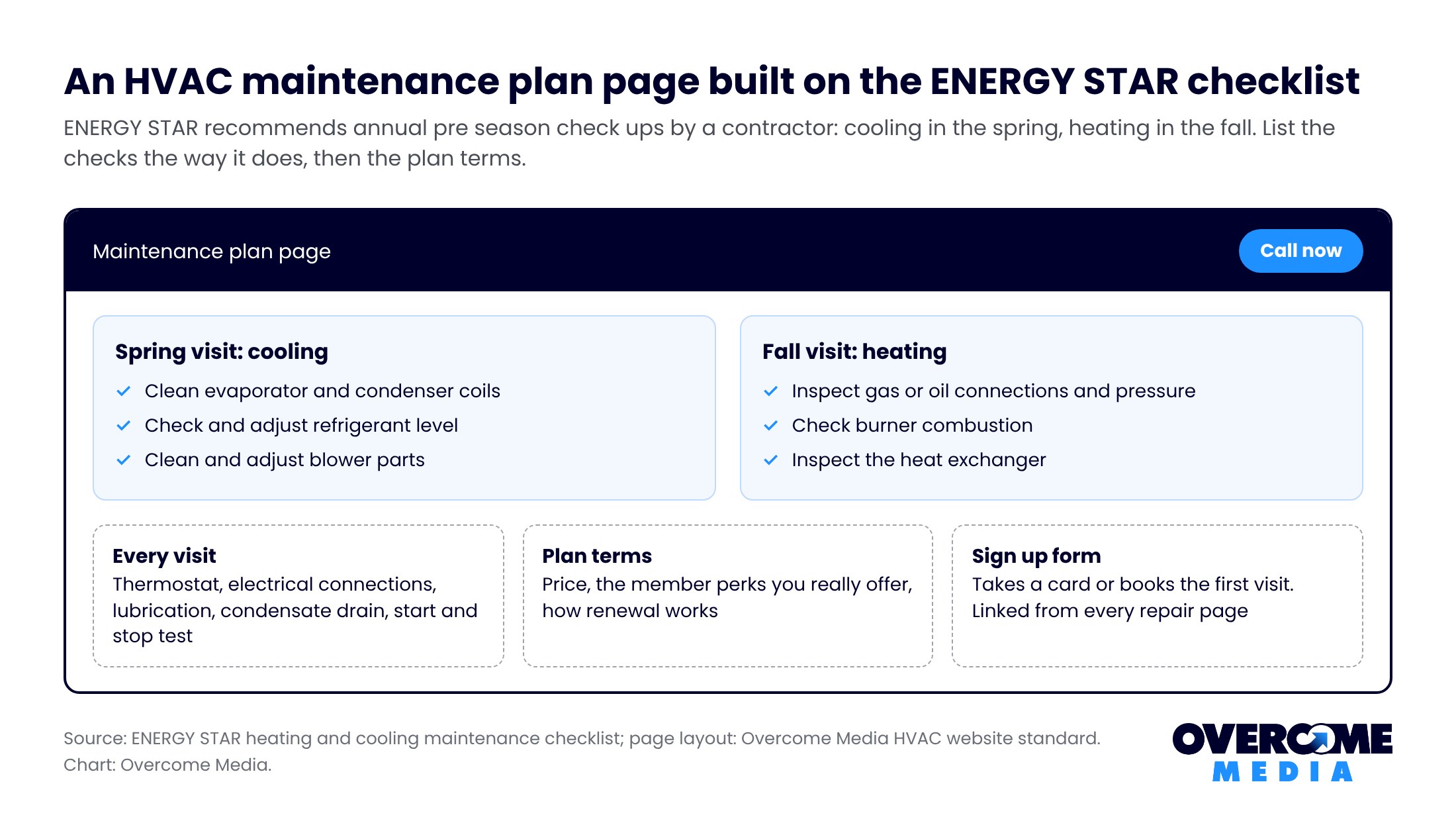
List the checks the way ENERGY STAR does. Buyers trust a list they can compare:
- Thermostat settings and electrical connections.
- Moving parts lubricated and the condensate drain cleared.
- Coils cleaned and refrigerant checked in the spring.
- Gas connections, burner and heat exchanger checked in the fall.
Then the plan details. State the price, the member perks you actually offer and how renewal works. Add a sign up form that takes a card or books the first visit.
Link the plan page from every repair page. The customer who just paid for a repair is the easiest plan sale you will get.
When should an HVAC website be updated for the season?
Two months before the season turns. New pages take weeks to rank, and the first heat wave will not wait for Google.
- Late winter. Publish or refresh AC repair, AC replacement and spring tune up pages.
- Late summer. Publish or refresh furnace, heat pump and fall tune up pages.
- Each switch. Swap the homepage banner and offer to the coming season.
Point your Google Posts at the same pages. One post per refreshed page, with a photo from a real job that week, keeps the profile and the site in step.
Keep last season’s pages live. Someone’s furnace still fails in April, and that page still ranks.
What makes HVAC website visitors call instead of leaving?
Proof that a real, nearby company will show up. Strangers are about to walk through the house.
- Photos of your techs and vans, not stock models in clean uniforms.
- Your license and the brands you are certified to install.
- Recent reviews that name the system and the fix.
- Financing on every replacement page.
- The same phone number and hours everywhere.
Ratings set the bar. BrightLocal’s 2026 consumer survey found 31 percent of people will only use a business rated 4.5 stars or higher.
Replies count as well. In the same survey, 80 percent said they are likely to use a business that responds to all its reviews.
Finally, measure it. Call tracking shows which pages and seasons bring booked jobs. Our HVAC leads guide ranks every channel by cost per job.
Running more than one trade? See the roofing website design and construction website design guides.
Frequently asked questions
What should an HVAC website include?
A call button on every page, a page per system and service, and a maintenance plan page. Add real tech photos, recent reviews and financing on replacement pages. Keep hours and phone numbers identical to your Business Profile.
How much does an HVAC website cost?
It depends on how many system and area pages you need, and whether tracking and a plan sign up are included. Our pricing page explains how we scope it.
Should an HVAC website list prices?
List fixed prices where you have them, like the diagnostic fee or the maintenance plan. For replacements, give a range and explain what moves it. Exact install prices depend on the home.
Do HVAC companies need a heat pump page?
If you install them, yes. AHRI data shows heat pumps outshipped gas furnaces in the US in 2025. Buyers search for them by name, and a general services page will not rank for that.
Why does my HVAC website get traffic but few calls?
Usually a hidden phone number, a missing system page or unanswered calls. Check the site on a phone first. Then use call tracking to see how many calls ring out.
Is your HVAC website ready for the next season?
We will check your call path, system pages, plan page and tracking. Then we will tell you what to build before the weather turns. Request the free audit or call (859) 710-8408.
Overcome Media is a marketing agency in Lexington, Kentucky. We work with heating and cooling companies across Kentucky, Ohio and the surrounding states. See what we do for HVAC companies and our website design service.
Sources
- Overcome Media Search Console and site audit data from an HVAC client, 2026. Client and cities withheld.
- Heat pumps vs gas furnace sales, Canary Media, reporting AHRI shipment data for 2025
- Residential Energy Consumption Survey air conditioning use, US Energy Information Administration
- Maintenance checklist, ENERGY STAR
- Local Consumer Review Survey 2026, BrightLocal
- Invoca Home Services Lead Conversion Benchmarks Report, July 2026; CallRail consumer survey, 2025

Written by
Faisal Zaman
Senior SEO Strategist, Overcome Media
Faisal runs SEO for Overcome Media’s roofing, HVAC, junk removal and dumpster rental clients. He builds the Google Business Profile, location page and content plans that get blue collar companies into the map pack, and writes the Knowledge Base from what works on live client accounts.